Customer questions are spread over mail, WhatsApp and phones.
Conversations in one placeplus automatic messages
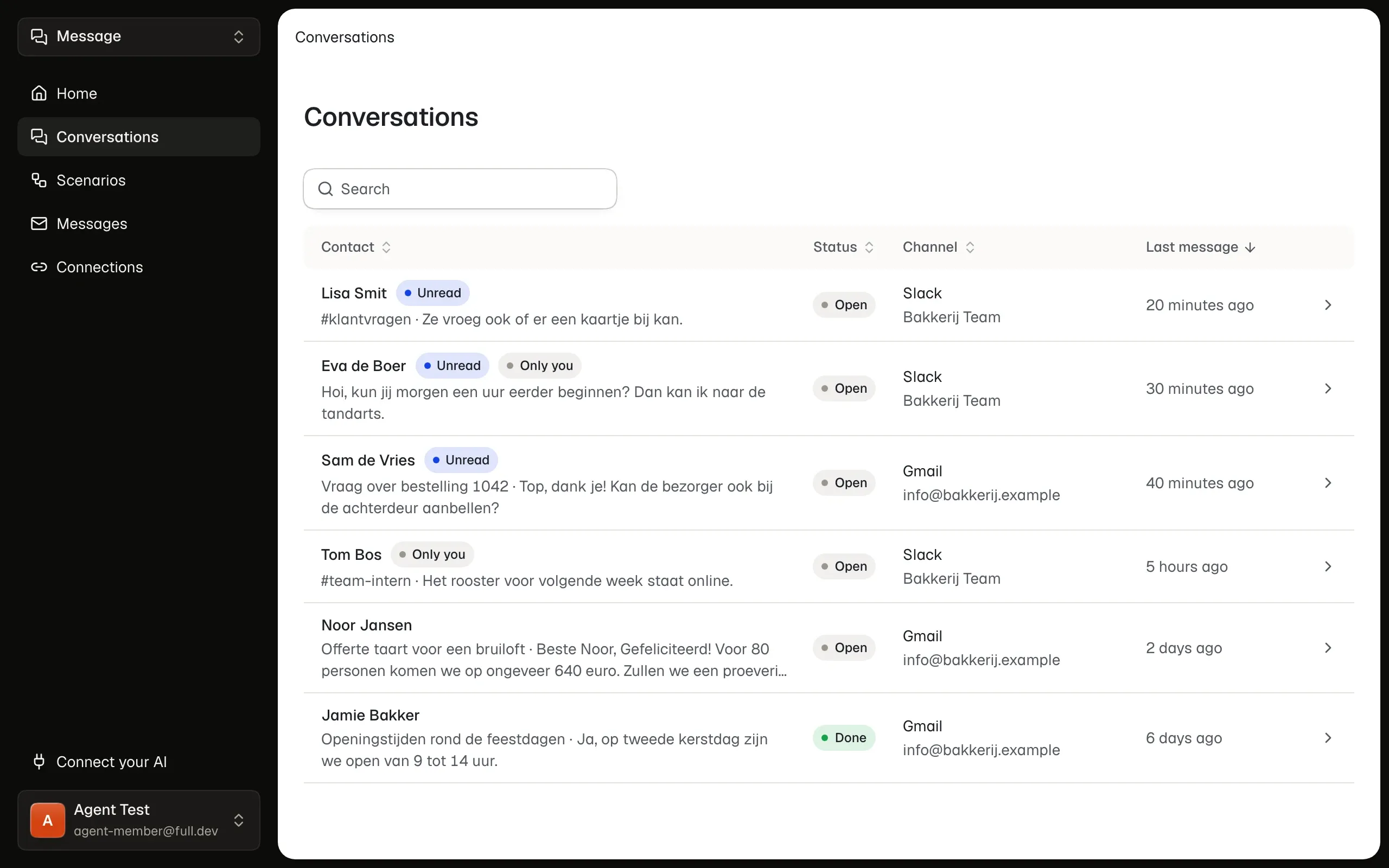
Fulldev Message puts your customer conversations from Gmail, WhatsApp and Slack in one list, where your team reads them and answers them itself. Message sends your regular messages, such as a reminder before an appointment, automatically by email or WhatsApp.
What we often hear about customer messages
This is how messages from and to customers go in most companies.
Colleagues answer from their own number.
We send reminders by hand, when someone remembers.
We have no overview of which questions are still open.
Our order system can’t send customers a WhatsApp.
We don’t know whether a message arrived.
Our messages come from an unknown no-reply address.
With Fulldev Message every customer conversation is in one place. Your team reads and answers together, and your regular messages go out on their own, from your own address and number.
One list for Gmail, WhatsApp and Slack
Conversations from your Gmail account, your WhatsApp Business number and Slack come into one list. You see right away what’s unread.
Answer from your business number
You write every reply yourself, nothing goes out automatically. A WhatsApp goes from your business number, an email in the same thread from your Gmail address.
Regular messages around your appointments
Message emails the guests in your Google calendar before or after an appointment. Move the appointment, and the old message no longer goes out.
How Message solves the other problems
From open questions to your own sender.
- Your team sees what’s still openEvery conversation is open or done. Whoever answers a question closes it, so nothing gets left behind.
- From your own systemYour order or planning system asks for an email or WhatsApp message through the API. Message sends it and never sends the same message twice.
- Every message to followYou see what is planned, sent, failed or cancelled, and for an error what you can do. On WhatsApp you also see whether it was delivered.
- From your own address and numberEmail goes through your own Google account, WhatsApp through your own WhatsApp Business account. You connect both in Fulldev Connect.
How it works
You connect your accounts once. After that conversations come in and your regular messages go out on their own.
Connect your accounts
An owner or admin connects your Google account, WhatsApp Business number or Slack workspace. For Gmail you turn on forwarding to the address Message gives you, and Message tests that it works.
Answer and close
Open a conversation, read its history and reply. Then close it, so your team sees what is still open.
Turn on your regular messages
Choose what starts a message, the channel and the moment, and write the text with a few variables, such as a date or time. WhatsApp approves a WhatsApp text first.
Frequently asked questions
What people ask us most about Fulldev Message.
Which channels work?
Your Gmail account, your WhatsApp Business number and Slack, in any workspace. A personal WhatsApp number is not included. Regular messages go by email or WhatsApp.
Can I keep using the WhatsApp Business app?
Yes. Your number can stay in the app. What you send from the app also shows up in the conversation in Message.
Does Message fetch my old messages?
No. Message gets the email Gmail forwards from the moment you set it up, and WhatsApp and Slack messages from the moment you add the account.
Does Message reply automatically?
No. You write every reply to a conversation yourself, and Message doesn’t change your mailbox. Only the regular messages you turn on go out automatically.
Who sees which conversations?
Owners and admins see every shared account, other colleagues only the accounts an admin gives them. Only you see your direct messages and private channels in Slack.
Does WhatsApp have to approve my text?
Yes. A regular WhatsApp text goes to WhatsApp for review first. Message shows what WhatsApp decides.
Can I send newsletters or campaigns too?
No. Regular messages are for a few messages at the right moment, not for campaigns or lists. Marketing emails have an unsubscribe link, and whoever sends STOP on WhatsApp gets no more messages there.
Join the waitlist
Fulldev Message is not open to everyone yet. Leave your email address and we will email you as soon as you can start.
We only email you when you can start. See the privacy statement.